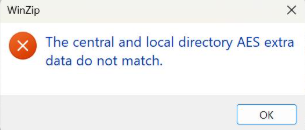
If you're trying to drag new files into an existing password-protected WinZip archive and you suddenly get hit with "The central and local directory AES extra data do not match," you're not alone — this is a known WinZip quirk that catches people off guard specifically when modifying encrypted archives rather than creating fresh ones.
What triggers this error
This happens specifically when you try to drag and drop additional files directly into an already-encrypted zip archive, rather than building the archive fresh with all files included from the start. AES encryption in zip files stores encryption metadata in two places — the central directory and the local file header — and these two records need to match exactly for WinZip to trust the archive's integrity.
When you add files to an already-encrypted archive via drag-and-drop, WinZip sometimes fails to update both of these records consistently. The result is a mismatch between what the central directory expects and what the local header actually contains for the newly added files — and WinZip refuses to proceed rather than risk corrupting or misreading the archive.
The fix
The reliable fix is to rebuild the archive from scratch rather than trying to add to the existing encrypted one:
- Extract (unzip) the entire contents of the encrypted zip file to a regular folder.
- Add your new files into that same extracted folder, alongside the existing ones.
- Select all the files together (the original ones plus the new ones) and create a brand new zip archive from scratch.
- Apply AES encryption and your password to this new archive as you normally would.
This works because the new archive is built in a single, consistent pass — WinZip generates the central directory and local headers together for every file at once, so there's no mismatch between old and newly-added entries.
Why this works: the AES extra data mismatch is fundamentally a metadata consistency problem, not a problem with the files themselves or with WinZip being broken. Rebuilding the zip from a clean folder sidesteps the issue entirely because every file gets its encryption metadata written correctly and consistently in one operation, instead of patching an already-finalized encrypted archive.
Why this happens in the first place
Standard (non-encrypted) zip archives are more forgiving about being modified after creation — adding a file to a regular zip is a simple, well-supported operation because there's no encryption metadata to keep in sync. AES-encrypted zips are stricter by design, since the whole point of the encryption layer is to guarantee that what's in the archive hasn't been tampered with or corrupted. That stricter validation is exactly what catches inconsistencies during in-place edits, even when the inconsistency is just a WinZip bug in how it updates the archive rather than any real corruption or security issue.
In short: encrypted zips are not really designed to be edited in place. Treat them as a final, sealed package — build them once with everything included, rather than opening them back up to add more later.